
Keep working. Your phone gets answered. Your AI receptionist, live in 3 minutes.
Phoneman answers every call, writes it up and sorts it by urgency. When one can’t wait, your phone rings.
Free to start · No annual contract · Keep your number
Call it yourself.
This is our own business line, and Phoneman answers it. Ask it what you’d want answered for your own business.

- Try “What do you do?”
- Try “Can I leave a message?”
- Try something it can’t know
While you work, your next job and your best customer both call.
Phoneman picks up both. Here’s what that looks like in an ordinary week.

Up a ladder
New customer- What happens
- A homeowner calls for a quote while you’re two storeys up, painting trim with a brush in each hand.
- What it costs you
- They don’t leave a message. They call the next name in their search, and that company gets the walkthrough.
- With Phoneman
- Phoneman takes the job, the address and when they want it done. Climb down when the coat is on and call them with it all in front of you.

Mid-cut
Existing customer- What happens
- A regular calls to move her Friday appointment while you’re halfway through a haircut.
- What it costs you
- She gets voicemail twice and books with the salon down the street, just this once.
- With Phoneman
- The write-up has the day she wants instead and the best number for her. Finish the cut and sort it out before your next client sits down.

Already on a call
New customer- What happens
- A new client calls while you’re on the phone with another one.
- What it costs you
- They hear it ring out, and the next firm on their list picks up.
- With Phoneman
- Every call is answered at the same time, however many come in. When you hang up, their name and what they need are waiting.

Saturday night
Existing customer- What happens
- A customer calls late on Saturday because water is dripping through their ceiling.
- What it costs you
- Voicemail until Monday, and a review that says nobody answered.
- With Phoneman
- Phoneman hears “water through the ceiling” and marks it Urgent, so your phone rings. The quiet calls wait until Monday.
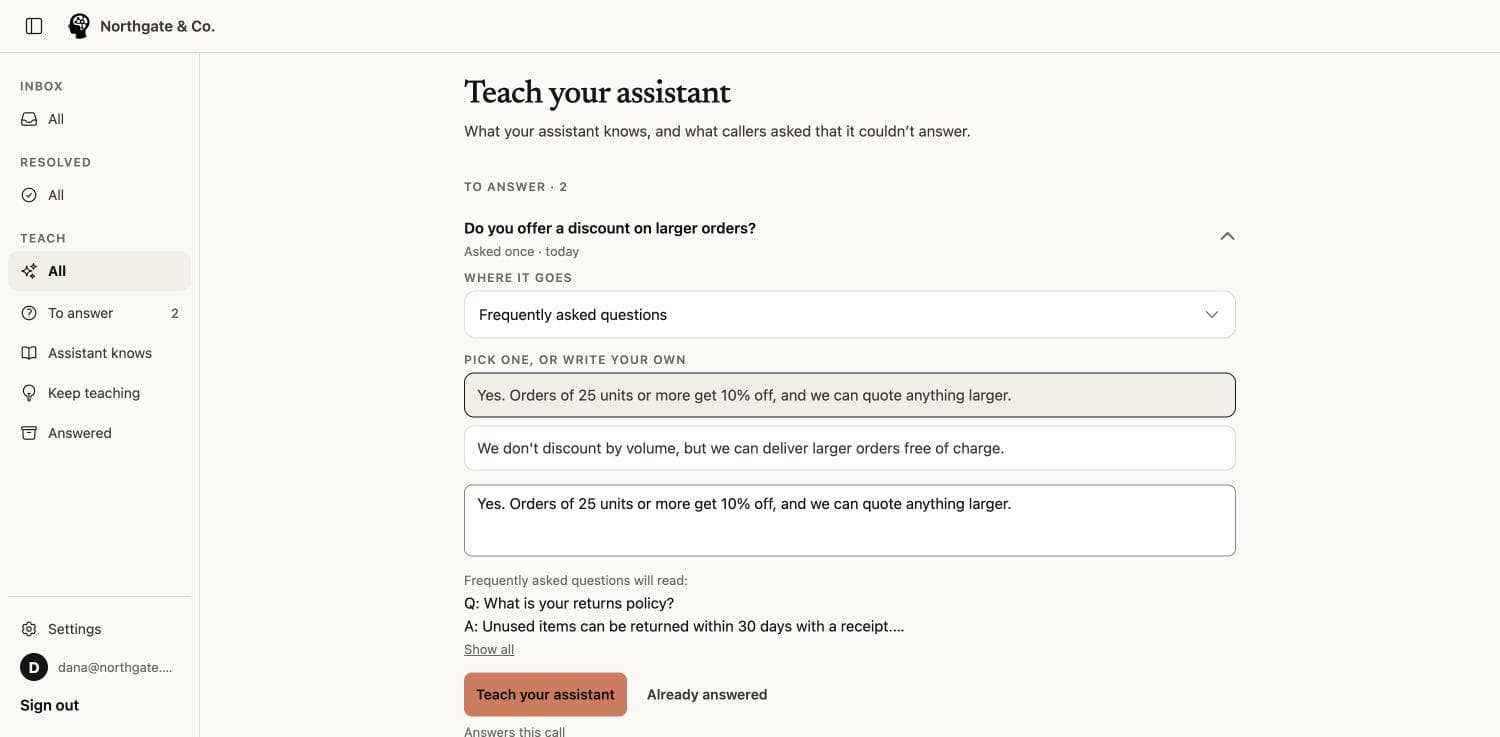
When it can’t answer, it asks you. You answer once.
The first week, it asks you a lot. Answer each question once, and every caller after that gets your answer.
- 01 · A new question
A caller asks something it doesn’t know.
Do you work on Saturdays?
It takes a message, and adds the question to your list.
- 02 · You answer once
It drafts an answer. You approve it in one tap.
Yes, 9 to 2, by appointment.
Pick a draft, edit it, or write your own. Nothing is added until you approve it.
- 03 · It gets it right
The next caller gets the right answer.
Next Saturday caller is told 9 to 2, by appointment.
Like a new hire who never needs telling twice.
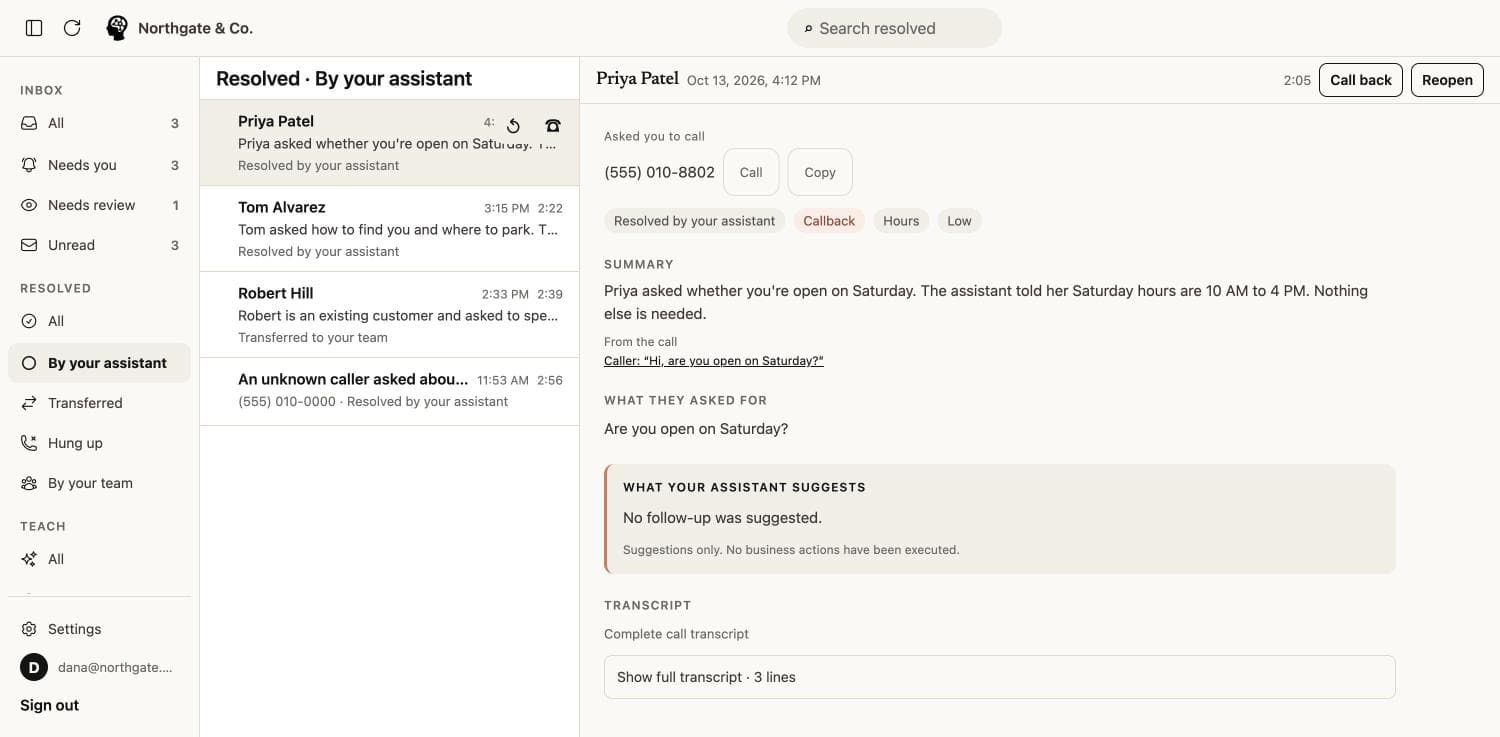
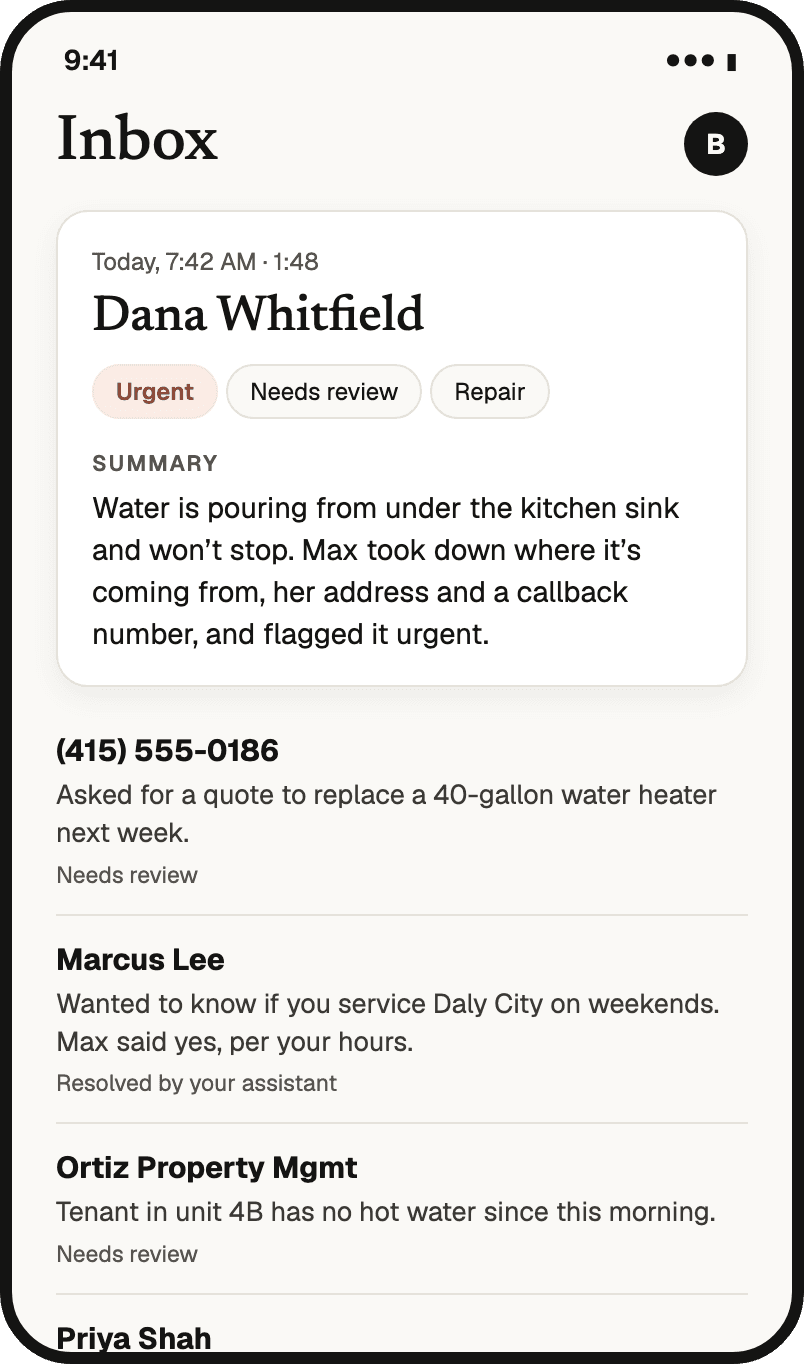
Know what happened on every call, without listening to it.
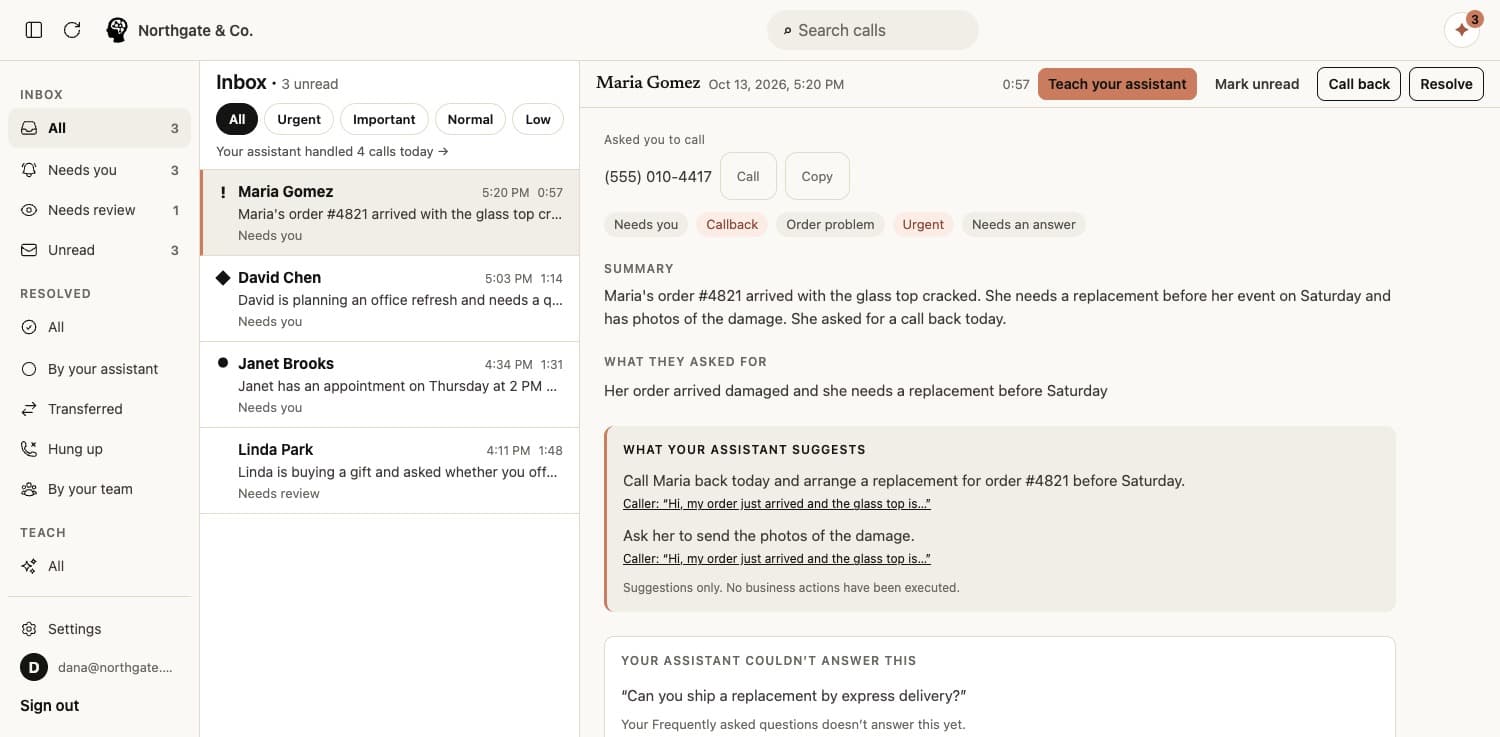
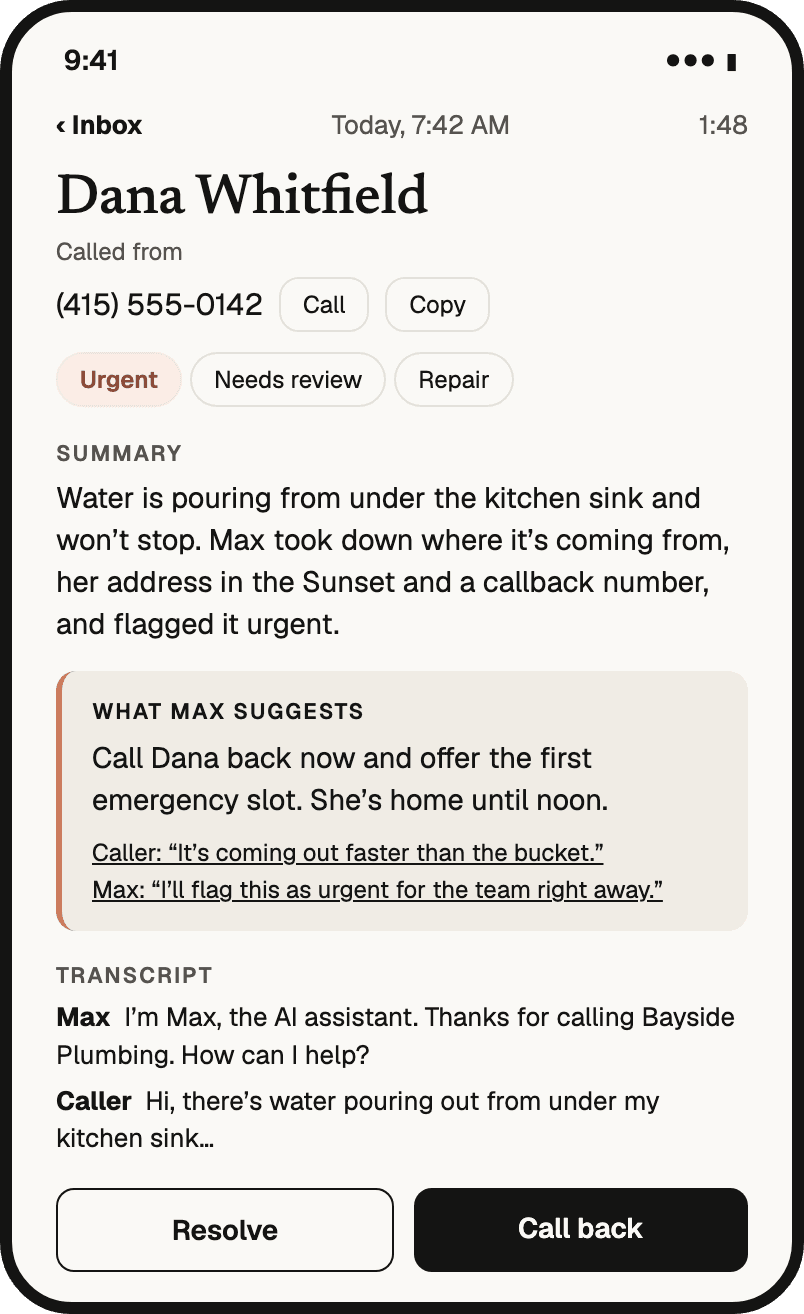
Every call, written up.
No voicemails to play back. Each call arrives as who called, what they asked for and what they need from you, with the caller’s own words one tap away.
Sorted by what matters.
Every call is marked Urgent, Important, Normal or Low and given a category, so a burst pipe never waits behind a question about your hours.
Routine calls handled. You see only what needs you.
Hours, directions, answers you’ve approved: it answers and closes those calls itself. You can always look back at everything it handled.
A receptionist that already knows your trade.
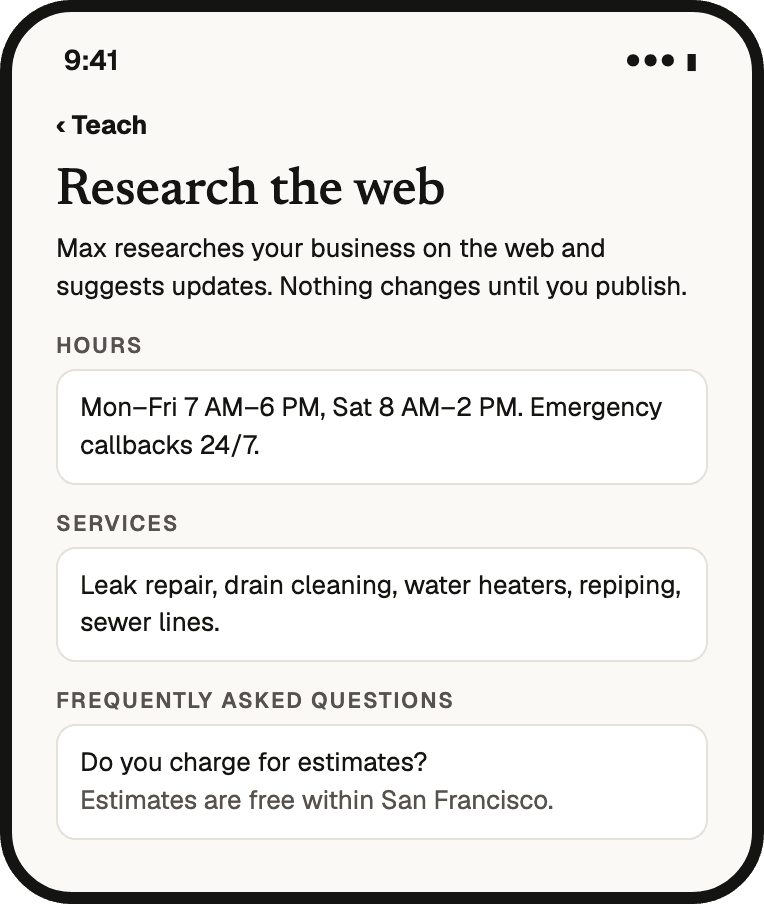
Pick your kind of business and Phoneman starts from what callers to a business like yours actually ask. Then it reads your website, so it knows your hours, services and service area before the first call.
 Home servicesQuote requests and no-heat calls while you’re up a ladder or under a sink.15 kinds of business →
 LegalNew-client intake while you’re in court, written up for the break.6 kinds of business →
 Professional servicesClient calls in your busiest season, sorted so you can stay focused.5 kinds of business →
 Local and personalCalls that come in while you’re with the customer in front of you.7 kinds of business →
 StartupsBuyers calling the number on your pricing page, and customers who are stuck.3 kinds of business →
Ready for your kind of business, including
- Plumbing
- Heating & Cooling
- Electrician
- Roofing & Contracting
- Handyman
- Locksmith
- Garage Door
- Pest Control
- Cleaning Service
- Landscaping & Lawn Care
- Moving
- Towing & Roadside
- Water & Fire Restoration
- Pool & Spa Service
- Appliance Repair
- Auto Repair
- Painting
- Law Firm
- Personal Injury Law
- Family Law
- Criminal Defense
- Immigration Law
- Estate Planning & Probate
- Accounting & Tax
- Insurance Agency
- Real Estate
- Property Management
- IT Support
- Home Care
- Salon & Spa
- Pet Grooming & Boarding
- Veterinary
- Funeral Home
- Software & AI Startup
- Fintech Startup
- Hardware & Deep Tech
- …and any other business
 Plumbing
 Heating & Cooling
 Electrician
 Roofing & Contracting
 Handyman
 Locksmith
 Garage Door
 Pest Control
 Cleaning Service
 Landscaping & Lawn Care
 Moving
 Towing & Roadside
 Water & Fire Restoration
 Pool & Spa Service
 Appliance Repair
 Auto Repair
 Painting
 Law Firm
 Personal Injury Law
 Family Law
 Criminal Defense
 Immigration Law
 Estate Planning & Probate
 Accounting & Tax
 Insurance Agency
 Real Estate
 Property Management
 IT Support
 Home Care
 Salon & Spa
 Pet Grooming & Boarding
 Veterinary
 Funeral Home
 Software & AI Startup
 Fintech Startup
 Hardware & Deep Tech
Medical or dental practice? Use the Agentman AI Receptionist for practices →
Answer the calls you can’t get to.
After hours
Evening and weekend callers get an answer, and their write-ups are waiting in the morning.
When you’re busy
Three calls at once? Every caller gets answered, with no busy signal.
While you’re on a job
Stay on the job. Urgent calls ring your phone, and the rest wait for you.
Catching new leads
New callers leave their name, what they need and the best way to reach them.
Screening calls
Sales pitches and robocalls are sorted Low, so they stop interrupting you.
Live in four steps. No tech skills, no sales call.
- 01
Find your business.
Type your business name. Phoneman reads your website and fills in your details for you to check.
- 02
Pick a voice and a greeting.
Choose from natural voices and hear each one before you decide.
- 03
Get a number and make a test call.
Call it yourself and see the write-up land in your inbox.
- 04
Forward your calls when you’re ready.
Keep your existing number. Forward it to Phoneman only when you’re happy.
No porting. Nothing changes until you forward.
Voicemail, an answering service or Phoneman?
| Voicemail | Answering service | Phoneman | |
|---|---|---|---|
| Answers every call | No | Usually, during their hours | Yes |
| Knows your business | No | A script | Your website and your answers |
| Gets better over time | No | Only if you rewrite the script | Learns from every call you answer once |
| Messages you can act on | A recording | A text or email | A sorted inbox with priorities |
| Setup | — | Days, often with a contract | Minutes, self-serve |
Compare every option, including when another is the better choice
Free to start. Pick a plan when you need more minutes.
Free
$015 AI minutes a month, no card needed.
Essentials
$29.99 / month100 AI minutes a month.
- Most popular
Plus
$99 / month300 AI minutes a month.
Pro
$199 / month600 AI minutes a month, then 30¢ a minute.
Only Pro buys extra minutes, at 30¢ each; on the other plans you move up a plan. No annual contract.
See pricingDo callers know they're talking to an AI?
Yes. It introduces itself as an AI assistant at the start of every call.
Do I have to change my phone number?
No. You get a new local number to test with, then forward your existing number to it when you're ready. Nothing changes until you forward.
How long does setup take?
About 3 minutes. Most of setup is checking details it has already filled in from your website, then a test call.
How does it learn my business?
It reads your website before the first call. After each call it lists the questions it couldn't answer and drafts answers for you. Approve one in a tap and the next caller who asks gets the right answer.
Can it transfer a caller to me?
Yes, if you turn transfers on. It offers to connect the caller to the number you set, during the hours you set, and only connects after the caller agrees.
Can it answer more than one call at a time?
Yes. There's no limit on calls at once, so nobody hears a busy signal, however many people call together.
What languages does it speak?
English, Spanish, Portuguese, French and German. Each call's transcript is in the language the caller spoke.
How do I hear about a call?
Your phone gets a notification as soon as each call is written up: who called and what they need. Urgent calls make a sound; the rest arrive quietly. You choose how much you hear.
What happens with a call it can't handle?
It takes a message, marks how urgent it is and suggests next steps. It is not an emergency line.
Is there a mobile app?
Yes, for iPhone and Android, with the same inbox you see in any web browser.
What does it cost?
Free to start, with 15 AI minutes a month and no card needed. Paid plans start at $29.99 a month. No annual contract.
Is it for medical or dental practices?
No. Practices handling patient calls should use the Agentman AI Receptionist for practices, which is built for them.
Phoneman on your phone and your computer.
Get a notification for every call in the Phoneman app for iPhone and Android, and the same inbox in any browser.
Set it up tonight. Tomorrow’s calls get answered.
Call it yourself first, and forward your calls only when you’re happy.
Phoneman is built by Agentman.